
Platform Overview
Applicable roles: Organization (top-level user), sub-user, developer Updated: 2026-07-14
The platform is an all-in-one AI model aggregation and routing service platform that provides enterprises with unified access to multiple models, intelligent routing, usage management, and organizational collaboration capabilities. This article helps you quickly understand the platform's positioning, core capabilities, and organization management approach.
1. Platform Positioning
The platform is an AI model aggregation and routing service platform designed for enterprise users. The platform itself does not develop or train models; instead, it acts as an intermediary service layer that provides enterprises with a unified access point for multiple models, intelligent routing and scheduling, usage management, and cost control capabilities.
- Console: Console address
If you are a legacy user, your account and balance are seamlessly retained—no need to re-register. See Migration and Transition Guide for details.
2. Core Capabilities
2.1 Unified Access to Multiple Models
Access the world's mainstream AI models through a single API, covering Anthropic, OpenAI, Google, and major domestic model vendors—no need to integrate with each vendor's API individually. The platform continuously expands its model ecosystem, and newly launched models can be called through the same entry point as soon as they go live.
Model Plaza (YOUR_API_BASE_URL/model-plaza) is the entry point for viewing all available models and prices. In Model Plaza, you can:
- Browse all models supported by the platform and filter by provider
- View the capability descriptions and pricing for each model
- Compare price differences across different groups
Model Plaza is on the official website and can be accessed without logging in. After logging into the console, you can see the models and call names available to your current organization on the "Call Guide" page, and recharge and manage subscriptions on the "Redeem" page.
When making a call, the model name can be obtained from the console's "Call Guide" page, Model Plaza, or via the /v1/models API. By default, calls use the model name, and the system resolves routing based on the group bound to the Key or the default routing configuration. The platform also offers group-identifier routing as an advanced capability; once enabled, you can use call names with group identifiers to precisely specify a group (when not enabled, calls with group identifiers will be rejected). See Developer Guide · Call Guide and Routing for details.
2.2 Multi-Channel Service System and Groups
The platform offers multiple service channels that differ in stability, response speed, and price. Enterprises can choose flexibly based on their business scenarios and budgets:
- What is a channel: A channel is a different service tier that the platform provides for model calls; different channels correspond to different service quality and price tiers
- Choose on demand: For routine development, choose cost-effective channels to reduce costs; for critical business, choose high-quality channels to ensure stability
- Dynamic adjustment: The channel list and prices are continuously optimized; the actual display on the platform takes precedence
What is a "group": The group is the concept you'll interact with most when using the platform. Simply put, a group = a service plan label—the same model (such as claude-sonnet-4-6) can be provided through different groups, and different groups may correspond to different channels, prices, and discounts. When creating an API Key, you can select a group for the Key, and calls will go through that group. You can also leave the Key unbound to a group and use the default routing configuration to specify which group a model name's calls go through.
- Groups are maintained centrally by the platform. You can see the currently available groups and the models under them on the console's "Call Guide" page
- You can view the channels available to your organization and their health status on the "Channel Status" page
- The specific prices and discounts for a group are as displayed in "Model Plaza"
2.3 Pay-As-You-Go Billing
The platform uses credits as the unified billing unit (CNY 1 = 1 credit), simplifying the billing complexity of multiple models and channels. Recharges go into the organization balance pool, and charges are deducted based on the actual number of Tokens consumed and the price of the selected group at call time.
- Instant crediting on recharge: CNY 1 = 1 credit, at a 1:1 conversion rate
- Metered by Token: Credits are deducted based on the actual number of Tokens consumed and the price of the selected group at call time
- Multiple recharge methods: Supports online payment recharge, redemption codes, promo code campaigns, and more
- Transparent billing: The Token consumption details of each call, usage statistics, and recharge and consumption records can all be viewed in the console
For the complete billing methods, multiplier explanations, and calculation examples, see Pricing.
2.4 Enterprise-Grade Organization Management
The new console provides teams and enterprises with complete organizational management capabilities. The console has two user roles with different scopes of capability:
| Role | Positioning | Who assumes it |
|---|---|---|
| Organization (top-level user) | Manages the organization's balance, sub-users, and usage | Enterprise account holder |
| Sub-user | Holds Keys to call models and views their own usage | Developers / callers under the organization |
The dashboard interface after an organization logs in:
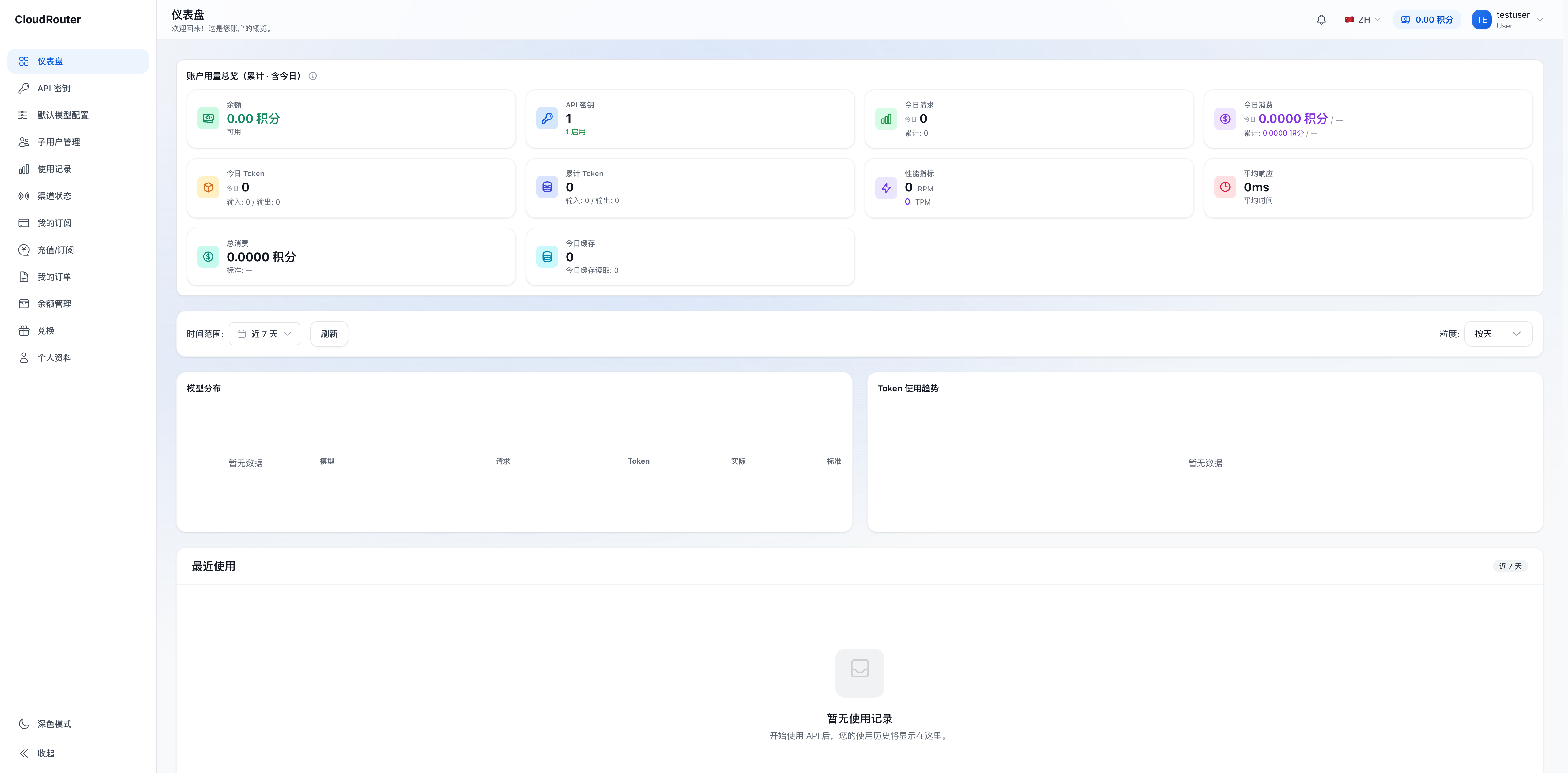
The core capabilities of an organization include:
- Organization balance pool: Unified recharge, unified deduction
- Sub-user management: Create / edit / disable sub-users, set business information and quota limits. See Sub-User Management for details
- Key management: Create API Keys and bind a routing group to each Key. See API Keys and Routing Groups for details
- Usage monitoring: Organization-level and sub-user-level Token usage statistics, billing queries, and trend analysis
The new version uniformly replaces the legacy term "tenant" with "organization," "member" corresponds to "sub-user," and "model group" is uniformly called "group." For a complete comparison of terminology and capabilities, see Migration and Transition Guide and Roles and Permissions.
3. Applicable Enterprise Types
| Enterprise Type | Applicable Scope | Typical Scenarios |
|---|---|---|
| One-Person Company (OPC) | Team of no more than 5 | Independent developers, freelancer studios |
| Small Enterprise | 6-50 people | Startups, small technical teams |
| Medium Enterprise | 51-500 people | Growth-stage tech companies, regional ISVs |
| Large Enterprise | More than 500 people | Publicly listed companies, group enterprises |
4. Start Here
| I want to… | Where to look |
|---|---|
| Understand the difference between organizations and sub-users | Account System Guide |
| Register and activate an organization account | Organization Registration and Activation |
| Manage team members | Sub-User Management |
| Create Keys and integrate into code | API Keys and Routing Groups |
| Learn about prices and billing methods | Pricing |
| See what changes after a legacy account migration | Migration and Transition Guide |
| I'm a sub-user—where do I start | Sub-User Handbook |