
Balance Management and Quota Allocation
Applies to: Organization (top-level user) Last updated: 2026-07-14
This document is the "master guide" to the funding system in the new console. It covers two things: how to manage the organization balance pool, and how to set quota limits for sub-users.
⚠️ Important conceptual change: the new version no longer has "individual member wallets." The organization balance pool is the sole source of funds; what you set for sub-users is a quota limit, not a distribution of money to them. Once you understand this, the operations below all fall into place.
For recharging (adding funds to the balance pool), see Recharge and Redemption Codes; for usage and billing, see Billing and Usage Monitoring.
1. Core Concept: One Pool, Multiple Quota Limits
The new console uses a two-tier funding model of "organization balance pool + sub-user quota limits":
- Funds from recharges (online / redemption code) go into the organization balance pool, which is the organization's sole source of funds
- The organization can set a quota limit for each of its sub-users, capping that sub-user's spending (e.g., sub-user A limited to 200, sub-user B limited to 500)
- When a sub-user calls a model, the amount actually deducted always comes from the organization balance pool, not the sub-user's own wallet—the quota limit is merely a cap on "the most it can spend"
| Concept | What it is | What it is not |
|---|---|---|
| Organization balance pool | The organization's sole source of funds; the spending of the organization itself and all sub-users is deducted from here | Not a collection of multiple wallets |
| Sub-user quota limit | A spending cap (quota) set for a sub-user, controlling "the most it can spend" | Not a separate wallet, not "allocating money to it" |
| Actual deduction | When a sub-user calls a model, the deduction always comes from the organization balance pool | Not deducting from the sub-user's wallet first, then the organization pool |
In a nutshell: the quota is a "capping valve," and the balance pool is the "sole fuel tank." Setting a quota for a sub-user means specifying the most fuel it can draw from the tank, not dividing the fuel into its own little tank.
Difference from the Old Version (Important)
The old version (v1) talked about allocating points from the organization balance pool to a member's individual balance, with the member's spending deducted from that individual balance. The new version (v2) no longer works this way:
| Dimension | Old version v1 (individual member balance) | New version v2 (sub-user quota limit) |
|---|---|---|
| What is given to the member / sub-user | A sum of money transferred over (individual wallet) | A spending cap (quota) |
| Who is deducted when spending | The member's individual balance | The organization balance pool |
| Change to the organization pool when setting the quota | Immediately deducts from the organization pool | No deduction; only sets a cap |
| Multiple keys | — | Multiple keys under a sub-user share the same quota limit |
If you are migrating from the old version, please stop thinking in terms of "distributing money to members." The new version is "capped quota + actual deduction from the organization balance."
2. Who Can Do What
✅ Allowed | ❌ No permission | 🔸 Limited to this organization's scope
| Capability | Organization | Sub-user |
|---|---|---|
| Recharge the organization balance pool (online / redemption code) | ✅ 🔸 | ❌ |
| Set / adjust a sub-user's quota limit | ✅ 🔸 | ❌ |
| Reclaim / reset a sub-user's quota | ✅ 🔸 | ❌ |
| View organization balance and transactions | ✅ 🔸 | ❌ |
| View own quota (read-only) | — | ✅ 🔸 |
At the top of the "API Keys" page, sub-users have a read-only "My Quota" section showing their own quota usage (format: "My Quota — Used X / Y points, Remaining Z"), but they cannot modify it. For the full role boundaries, see Roles and Permissions.
3. Viewing Organization Balance and Transactions
On the Balance Management page (in the left navigation bar after logging in as an organization), you can view:
- The current organization balance, along with entry points for recharging, refreshing, and other operations
- The complete balance change history
Balance Management page:
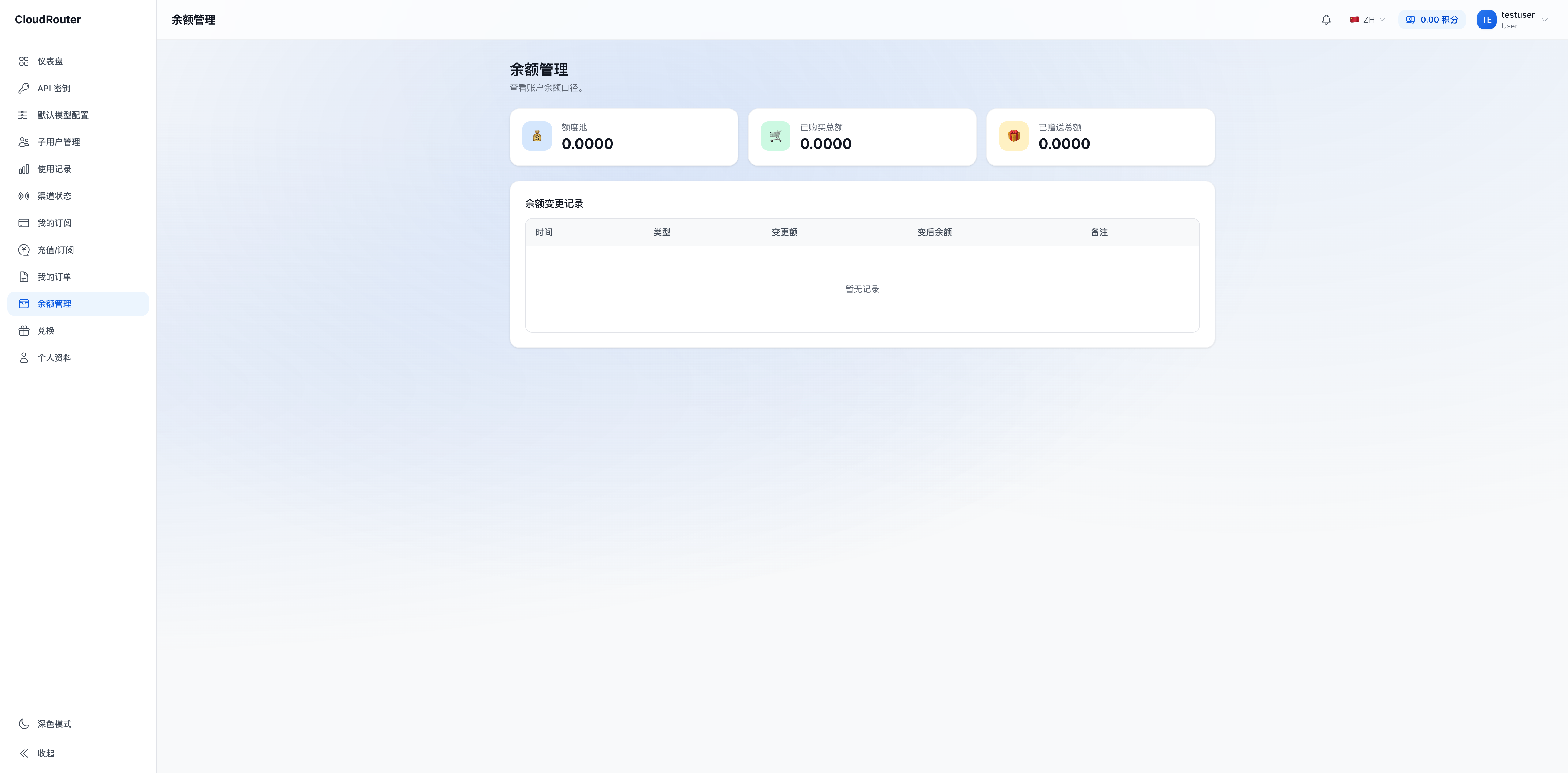
Balance Transaction Type Reference
| Type | Direction | Description |
|---|---|---|
| Online recharge | +Organization pool | Added via online payment on the "Redeem" page |
| Redemption code | +Organization pool | Added via a redemption code on the "Redeem" page |
| Recharge | +Organization pool | The platform recharges the organization directly |
| Promo code | +Organization pool | Added via a promo code (e.g., sign-up gift) |
| Consumption | -Organization pool | Deduction from the organization itself or a sub-user calling a model |
| Refund | -Organization pool | Deduction from a refund operation |
Each transaction typically includes: time, type, amount, description, related user, operator, balance before the change, and balance after the change, which can serve as an audit basis.
Note: in the new version, sub-user spending is deducted directly from the organization balance pool, so "consumption" transactions reflect a decrease in the organization pool. The old version's "allocation (organization pool → member) / reclaim (member → organization pool)" fund-transfer transactions no longer occur in the new version—setting a sub-user's quota does not generate a fund-transfer record.
4. Setting / Adjusting a Sub-user's Quota Limit
Setting a sub-user's quota is done on the Sub-user Management page (this is not transferring money away, but setting a cap).
Steps
- Left navigation bar → Sub-user Management
- Locate the target sub-user and open its edit / quota settings entry
- Set the quota limit: enter the maximum amount this sub-user can spend
- Takes effect immediately upon saving
The exact field names (such as "quota limit" or "quota"), and whether recurring quotas are supported, are subject to the actual console interface. For full operations such as creating, deactivating, and setting business information for sub-users, see Sub-user Management.
Key Rules
- Setting a quota does not deduct from the organization pool: setting a quota merely specifies the sub-user's spending cap; the organization balance pool is not reduced as a result
- Sharing the same quota limit: multiple keys under the same sub-user share its quota limit; each key does not have its own separate quota
- Actual deduction from the organization balance: each sub-user call actually deducts from the organization balance pool; the quota limit only determines "how much more it can spend in total"
- Quota can be adjusted at any time: both increases and decreases take effect immediately; if you lower it below the amount already spent, that sub-user will be unable to continue making calls
- The organization's own spending is not subject to quota limits: quotas apply to sub-users; the organization's (top-level user's) own calls go directly against the organization balance pool
5. What Happens When a Sub-user's Quota Is Exhausted / the Balance Is Insufficient
These are two different kinds of "running out," and they behave differently:
| Situation | Trigger condition | Behavior |
|---|---|---|
| Sub-user quota exhausted | A sub-user's cumulative spending reaches its quota limit | All keys under that sub-user are rejected together; other sub-users in the organization are unaffected |
| Organization balance pool insufficient | The organization balance pool is insufficient to cover this call | Calls across the entire organization are affected; the API returns HTTP 403 (balance-related; the specific error code is subject to the actual API response) |
⚠️ Sub-user quota exhaustion takes effect per sub-user, not per individual key—because multiple keys share the same quota limit, once the quota is exhausted, all of that sub-user's keys are rejected. To restore, simply raise its quota limit (provided the organization pool still has a balance).
To restrict a sub-user's calls, there are two approaches:
- Lower / exhaust its quota limit: all keys under it are rejected together
- Deactivate the sub-user account: see Sub-user Management
6. Reclaiming / Adjusting Quotas
The new version has no "reclaim funds from a member's wallet back to the organization pool" fund-recovery action like the old version—because the money was always in the organization pool to begin with. The new version's "reclaim" is essentially adjusting a sub-user's quota limit:
| Your goal | How to do it in the new version |
|---|---|
| Stop a sub-user from spending further | Lower or reset its quota limit (all keys under it are then rejected) |
| Sub-user leaves / is deactivated | Deactivate the sub-user account; its historical usage is aggregated to the parent organization |
| Temporarily tighten the budget | Uniformly lower the quota limits of the relevant sub-users |
- Adjusting a quota limit takes effect immediately and involves no fund transfer in the organization pool
- After a sub-user is deleted, its historical usage is aggregated to the parent organization and is not retained separately at the user level
7. Typical Funding Operations Workflows
Launching a new team
充值到组织余额池 → 创建子用户 → 分别设额度上限(如各 200)→ 创建 Key → 子用户开始调用Controlling a sub-user's spending
子用户管理 → 下调其额度上限 → 其名下全部 Key 在额度用尽点被拒A sub-user leaves
子用户管理 → 停用 / 删除该子用户 → 其历史用量归集到组织 → 组织池余额不受影响Monthly reconciliation / invoicing
余额管理查流水 → 余额管理下载凭证 → 开票问卷申请发票(见《发票与凭证》)8. FAQ
Q: When I set a quota for a sub-user, will it deduct money from the organization balance pool?
A: No. Setting a quota merely sets a spending cap; the organization pool balance does not change. Only when the sub-user actually calls a model is the amount deducted from the organization pool.
Q: Do sub-users have their own wallet / balance?
A: No. In the new version, sub-users have no separate wallet, only a "quota limit." They can view their own quota usage (the read-only "My Quota" section at the top of the API Keys page), but all spending is deducted from the organization balance pool.
Q: For multiple keys under a sub-user, is the quota counted separately or combined?
A: Combined. Multiple keys of the same sub-user share the same quota limit, and their cumulative spending is all counted against its quota limit.
Q: Can the sum of all sub-users' quota limits exceed the organization balance?
A: Yes. A quota limit is a "capping valve," not a pre-deducted fund, so the sum of the sub-users' quotas may exceed the organization balance. But actual deductions come from the organization pool—once the organization pool is exhausted, it returns HTTP 403 (balance-related) and everyone is affected. Please set quotas reasonably based on your actual budget.
Q: A sub-user's quota is exhausted; how do I restore its calls?
A: On the Sub-user Management page, simply raise its quota limit, provided the organization balance pool still has a balance.
Q: I want to "reclaim" the quota given to a sub-user; how do I do that?
A: The new version has no concept of fund recovery. You just need to lower or reset its quota limit on the Sub-user Management page—the money has always been in the organization pool and never left.
Q: When the organization itself calls a model, is it subject to the quota limit?
A: No. Quota limits are set for sub-users; the organization's (top-level user's) own calls go directly against the organization balance pool.
Q: Can the platform recharge my organization directly?
A: Yes. The platform can directly recharge the organization balance pool (shown as a "Recharge" type in the transactions); please contact the platform if needed. However, setting sub-user quotas is typically something you, as the organization, do yourself.
9. Notes
- The organization balance pool is the sole source of funds; sub-users have no separate wallet
- Setting a sub-user's quota sets a spending cap; it does not deduct from the organization pool or transfer funds
- A sub-user's multiple keys share the same quota limit; when the quota is exhausted, all keys under it are rejected together
- Actual deductions always come from the organization balance pool; when the organization pool is insufficient, calls return HTTP
403(balance-related; the specific error code is subject to the actual API response) - Raising the organization-level concurrency limit, adjusting the range of available models, and similar changes require contacting the platform; see Roles and Permissions
- All balance changes leave a trace in the transactions and can serve as an audit basis