
API Keys and Route Groups
Applicable roles: Organization (top-level user), sub-user, developer Updated: 2026-07-14
An API Key is the credential for calling models. This article explains how to create, configure, and manage Keys, as well as how requests are routed when calling.
For a complete description of routing rules, see Developer Guide · Calling Guide and Routing.
1. The Key Routing Model
Basic Routing
When creating a Key, you can choose to bind it to a routing group:
- Bound to a group: when calling with a model name, the request is routed to that group
- Not bound to a group: when calling with a model name, the system resolves according to the default routing configuration (sub-user default → organization default → platform default). See "Default Routing Configuration" below for details.
What is a group? A group is essentially a service package label—the same model can be provided through different groups, and different groups may correspond to different channels, prices, and discounts. Groups are maintained centrally by the platform, and you can see the currently available groups in the Model Marketplace. See Platform Introduction · Multi-Channel Service System and Groups for details.
Default Routing Configuration
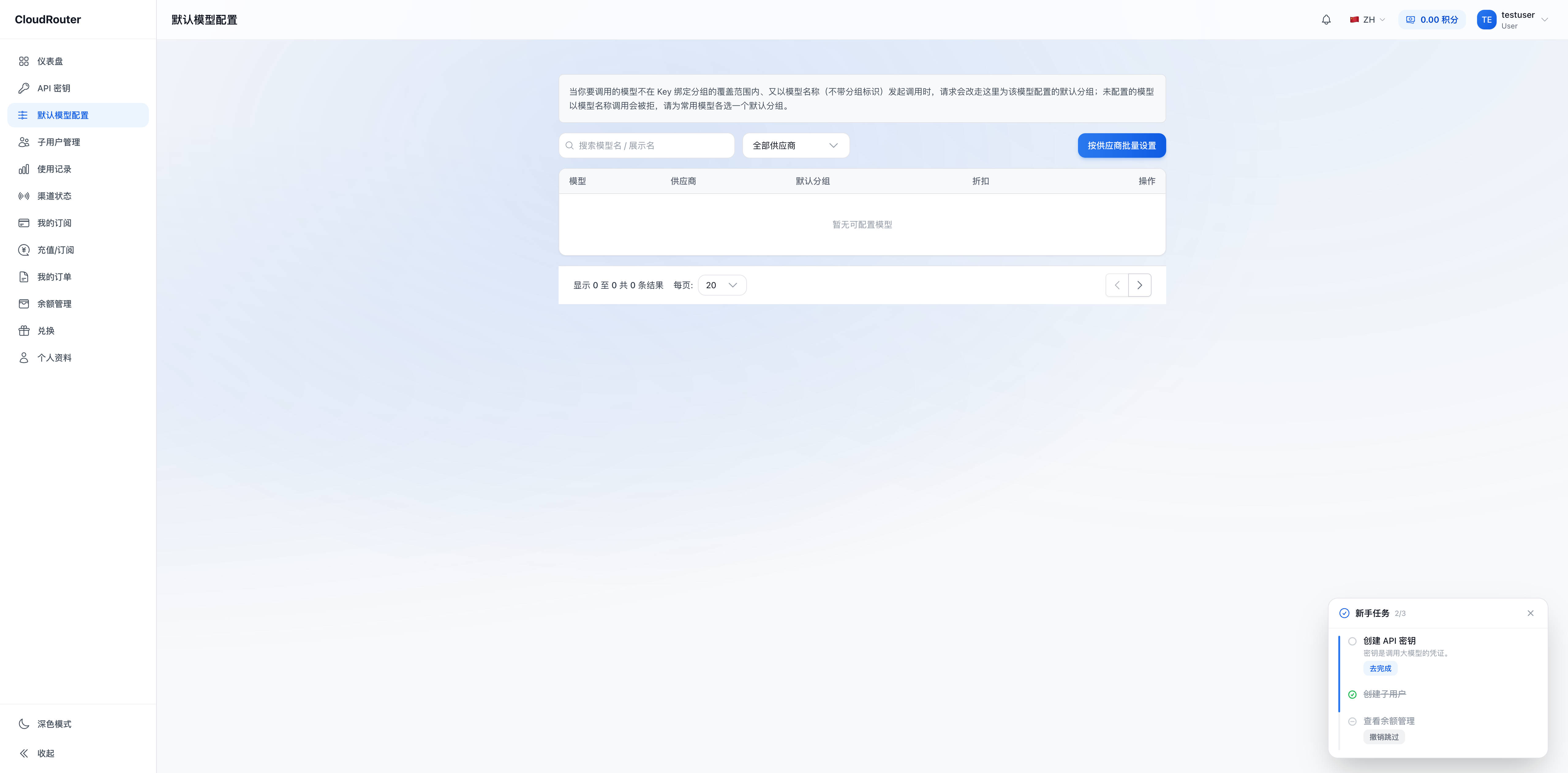
In addition to binding a group to each Key, you can also configure default routing for the entire account—specifying which group each model name goes to by default. This way, even if a Key is not bound to a group, model-name calls can still be routed correctly.
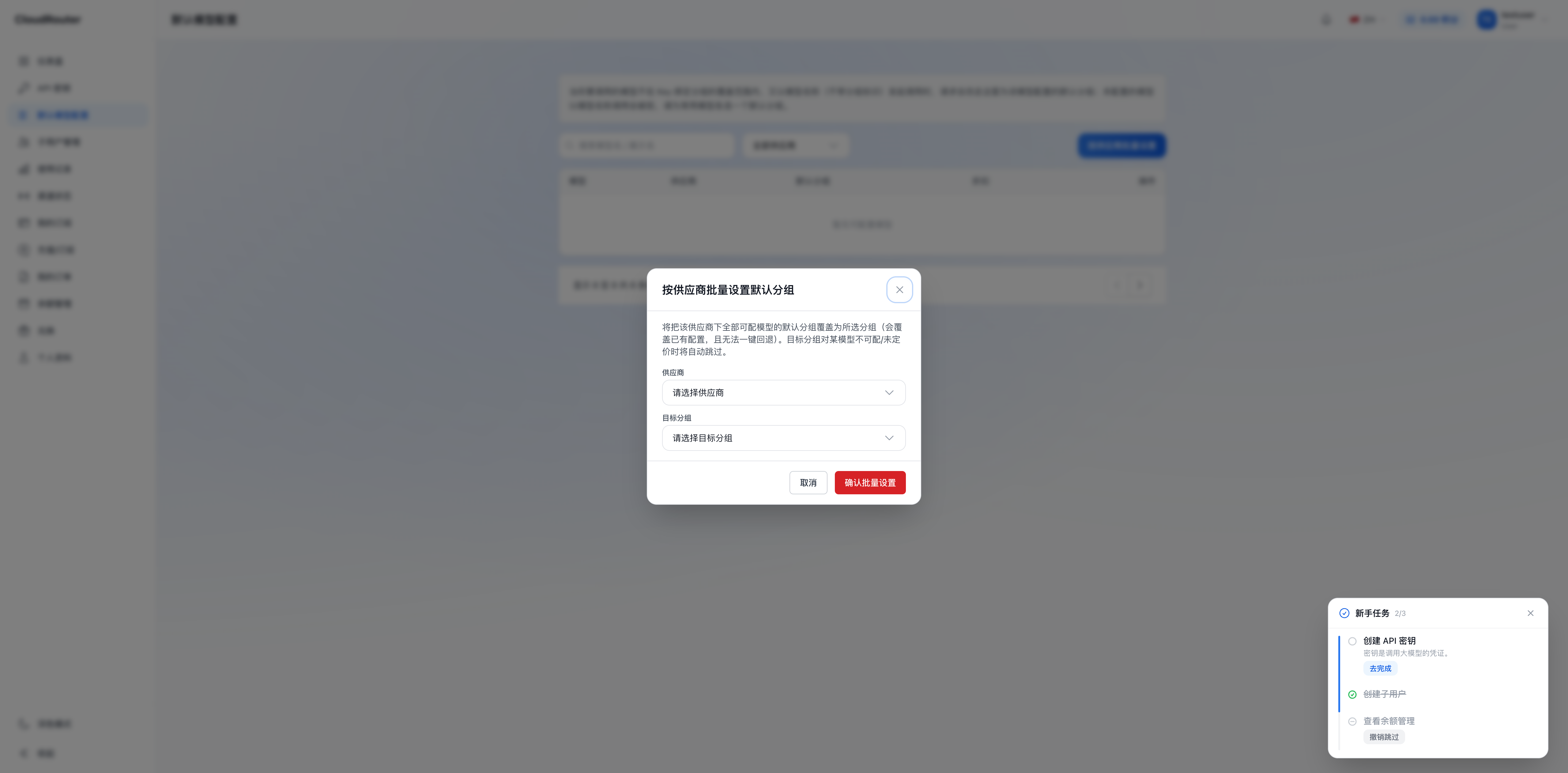
The configuration entry is in the console and supports setting per model or in bulk by provider.
Routing resolution priority (for model-name calls):
- The routing group bound to the Key
- Sub-user default routing configuration
- Organization default routing configuration
- Platform default routing
Default model configuration page:
Setting default groups in bulk by provider:
Advanced: Group Identifier Routing (requires activation)
After the platform and organization enable group identifier routing, you can also use a call name with a group identifier prefix (such as 5MHXZWKA/gpt-4o) to target a specific group. In this case, the organization can configure a "dispatch group allowlist" for the Key to constrain which groups group-identifier calls can reach.
Group identifier routing is disabled by default and does not need to be enabled in most scenarios. See Calling Guide and Routing for details.
2. Who Can Create Keys
| Role | Can Create Keys | Description |
|---|---|---|
| Organization (top-level user) | Yes | Can create Keys, configure routing groups and default routing; after group identifiers are enabled, can configure a dispatch group allowlist |
| Sub-user | Yes | Can create Keys independently; routing groups can only be selected within the scope authorized by the organization |
- Both organizations and sub-users can create Keys independently on the "API Keys" page (
/keys). - When a sub-user creates a Key, the routing group dropdown only lists the groups the organization has authorized for it.
- All Keys under a sub-user share the same quota cap (i.e., the quota cap's cumulative consumption count), while actual charges are always deducted from the balance of the owning organization (parent account). See Sub-User Management for details.
- Sub-users also have a "My Quota" section at the top of the Keys page, which read-only displays their quota usage (format: "My Quota: Used X / Y credits, Remaining Z").
3. Create / Edit a Key
- Go to the "API Keys" page (
/keys) - Click the "Create Key" entry
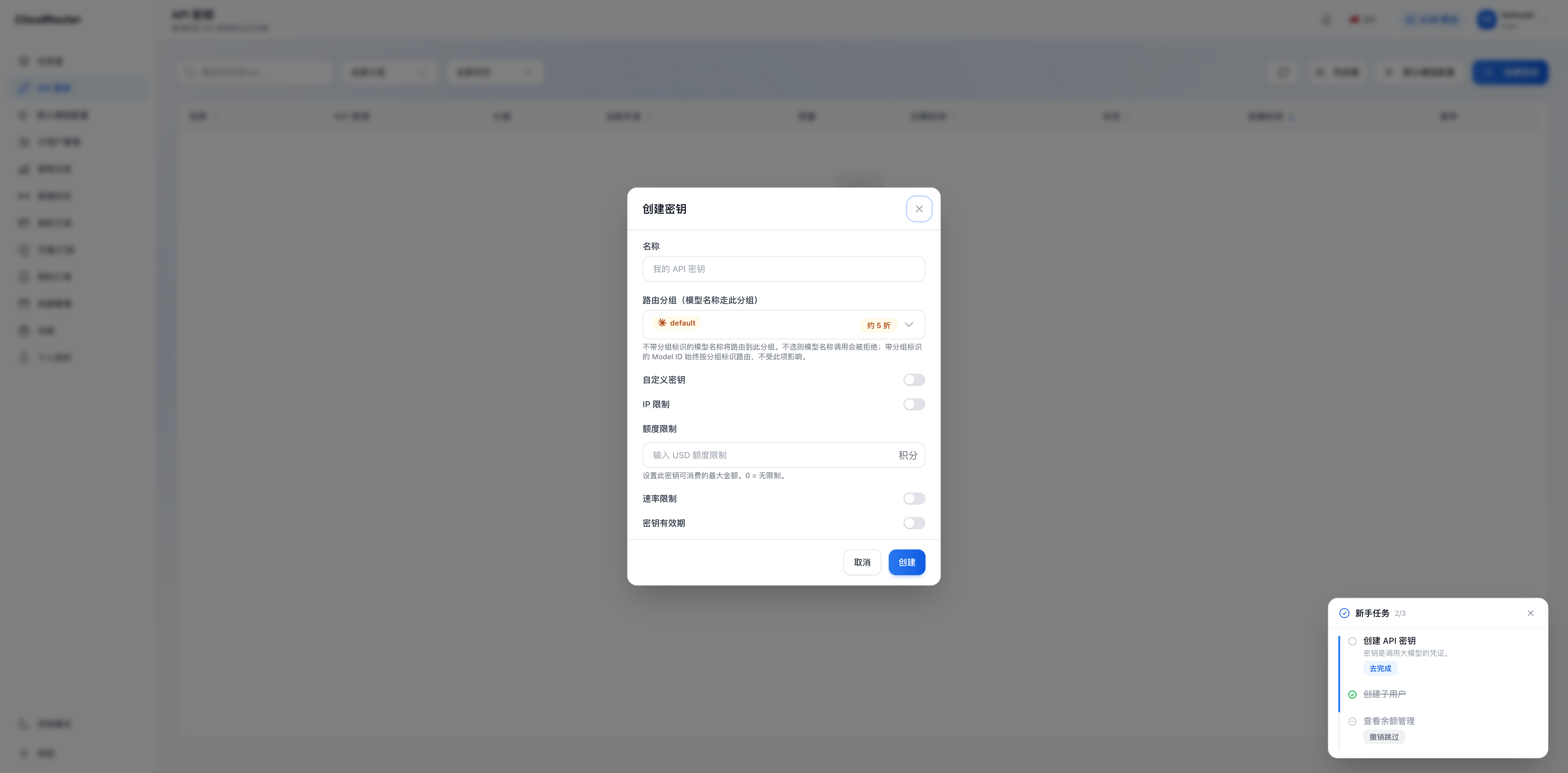
- Configure the following items:
| Configuration Item | Description |
|---|---|
| Name | The display name of the Key (placeholder: My API Key) |
| Routing group (model names go to this group) | Select a group from the dropdown. Model names without a group identifier will be routed to this group. When not selected, model-name calls follow the default routing configuration (sub-user default → organization default → platform default); if the default routing does not cover it either, the call is rejected. Model IDs with a group identifier are always routed by the group identifier and are unaffected by this item |
| Custom secret | Toggle; allows customizing the Key content |
| IP restriction | Toggle; configures IP restrictions |
| Quota limit | Input field (credits); sets the maximum amount this Key can consume. 0 = unlimited |
| Rate limit | Toggle |
| Key validity period | Toggle |
After group identifier routing is enabled, the organization can also configure a "dispatch group allowlist" when creating/editing a Key (constraining the groups reachable by group-identifier calls; not visible to sub-users).
The configuration window that pops up after clicking "Create Key":
- After submitting, please save the generated Key securely
4. Key List Display
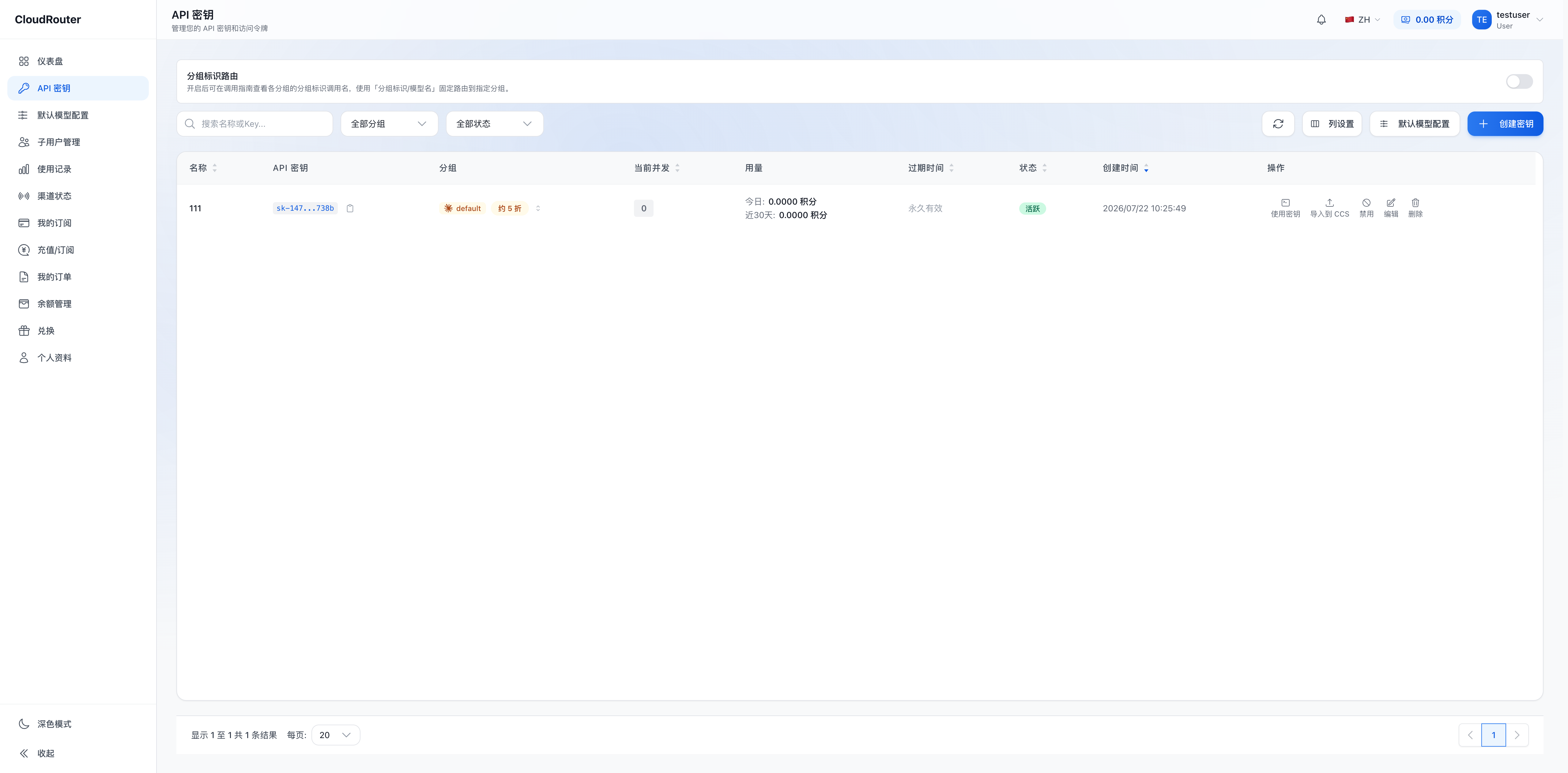
The "API Keys" page list displays key information for each Key:
| Column | Description |
|---|---|
| Name | The display name of the Key |
| API Key | The masked secret (e.g., sk-062...8c96), copyable |
| Group | The bound group name; if unbound, displays "No group bound, please edit to bind" (orange warning) |
| Usage | Credits consumed today and over the last 30 days |
| Expiration | Never expires or a specific date |
| Status | Active/Disabled |
| Created | Creation date and time |
| Actions | Use Key, import to CCS, disable, edit, delete |
API key management page:
5. How Routing Works When Calling
The routing behavior of the model name during a call depends on whether it has a group identifier prefix:
| model called | Routing behavior |
|---|---|
Model name (e.g., gpt-4o) |
Resolved by priority: Key-bound group → sub-user default → organization default → platform default |
With group identifier (e.g., 5MHXZWKA/gpt-4o) |
When group identifier routing is enabled, routed fixedly to the group corresponding to that group identifier; when not enabled, rejected |
- When the selected channel is unavailable, an error is returned directly—no automatic channel switching, no downgrade, no fallback
- The usage records show the routing source of each call (Key binding / sub-user default / organization default / platform default / group identifier)
6. Legacy Key Compatibility
After the new version goes live, legacy Keys remain valid and calls are not interrupted:
- Legacy Keys still work according to their originally bound group, with behavior consistent with the old version
- Legacy clients and legacy scripts require zero modification and can continue using model names as before
For migration-related information, see Migration and Transition Notes.
7. FAQ
Q: Must I select a group when creating a Key? A: Not necessarily. If you have already configured default routing, a Key without a bound group can still be called with model names. If a group is bound, the bound group takes priority.
Q: Can a single Key use multiple groups at once? A: Model-name calls go to a single group following the resolution chain. If you need the same Key to flexibly call different groups, you can enable group identifier routing and use call names with group identifiers.
Q: Can sub-users create their own Keys? A: Yes. Sub-users can create Keys independently on the "API Keys" page, with routing groups limited to the scope authorized by the organization.
Q: What should I fill in for model when calling?
A: Just fill in the model name (e.g., claude-sonnet-4-6). Model names can be obtained on the console's "Calling Guide" page, in the Model Marketplace, or via the /v1/models API.
Q: If a channel is unavailable, will another one be substituted automatically? A: No. When the selected channel is unavailable, an error is returned directly—no automatic switching, no downgrade, no fallback.
Q: What should I do if a Key is lost or suspected to be compromised? A: Find the Key on the "API Keys" page, click disable or delete, then create a new Key. A disabled or deleted Key becomes invalid immediately and cannot be recovered.